Have you ever copied a paragraph from a website and found that every word was written in capital letters? Or perhaps you typed a heading in lowercase and later realized it needed to look more professional. Changing the capitalization of text manually can be frustrating, especially when you are working with long documents, articles, emails, or website content.
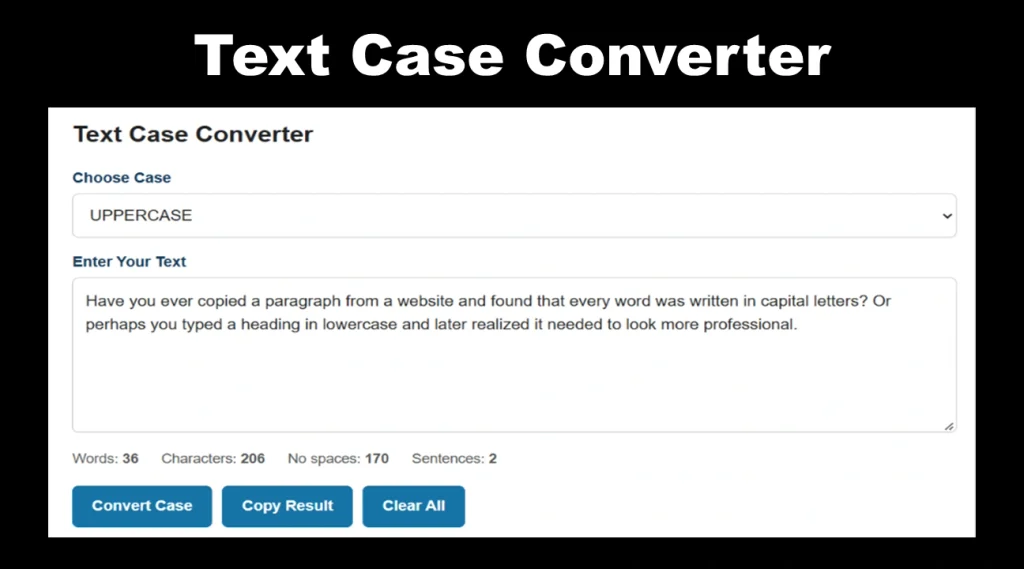
A text case converter makes this task much easier. It allows you to change the capitalization of words, sentences, and entire paragraphs without typing everything again. Whether you are preparing a blog post, formatting a document, writing a social media caption, or editing website content, understanding different text cases can help you present your writing more consistently.
What Is a Text Case Converter?
A text case converter is an online tool that changes the capitalization of existing text into a selected format. Instead of editing each letter individually, you can paste your content, choose the required case, and convert the text in seconds.
For example, the sentence “welcome to our website” can be changed into “WELCOME TO OUR WEBSITE” using uppercase, or “Welcome To Our Website” using title case.
The words themselves generally remain unchanged; only their capitalization is adjusted. This makes text case conversion useful when you need to correct formatting quickly without rewriting your content.
Different Types of Text Case
There are several text formats used in everyday writing. Each serves a different purpose, depending on the type of content you are preparing.
1. Uppercase
Uppercase converts every letter into a capital letter.
Example:
Original: Welcome to our website
Uppercase: WELCOME TO OUR WEBSITE
This format is commonly used for short headings, labels, warning messages, abbreviations, and selected design elements. However, writing long paragraphs entirely in uppercase can make them harder to read and may appear as if you are shouting in an online conversation.
2. Lowercase
Lowercase changes all letters to small letters.
Example:
Original: WELCOME TO OUR WEBSITE
Lowercase: welcome to our website
This format is useful when correcting text that was accidentally typed in capital letters. It can also help standardize certain types of data, usernames, or text used in technical workflows. Remember that proper nouns and the first word of a sentence may need capitalization afterward.
3. Title Case
Title case capitalizes the main words in a heading or title. The exact rules can vary depending on the style guide being followed.
Example:
Original: how to improve your website content
Title case: How to Improve Your Website Content
Title case is often used for article titles, page headings, presentation titles, and other prominent text. It gives headings a consistent appearance, although some style guides keep short articles, conjunctions, and prepositions lowercase.
4. Sentence Case
Sentence case capitalizes the first letter of a sentence while keeping the other words lowercase unless they require capitalization.
Example:
Original: THIS IS A SIMPLE GUIDE TO TEXT FORMATTING.
Sentence case: This is a simple guide to text formatting.
Sentence case works well for paragraphs, descriptions, instructions, and general website content. It usually creates a more natural reading experience than using uppercase throughout a passage.
5. Capitalized Case
Capitalized case typically makes the first letter of each word uppercase.
Example:
Original: learn how to format your text
Capitalized case: Learn How To Format Your Text
This format can resemble title case, but the two are not always identical. Capitalized case often applies capitalization to every word, while title case may follow rules that leave certain short words lowercase.
6. Alternating Case
Alternating case switches between uppercase and lowercase letters.
Example:
Original: learn something new
Alternating case: LeArN SoMeThInG NeW
This style is mainly used for creative text, informal social media posts, and playful visual effects rather than professional documents.
Why Use an Online Text Case Converter?
An online text case converter can save time and reduce repetitive editing. Its benefits become particularly noticeable when you regularly work with large amounts of text.
Saves time: Converting an entire paragraph takes much less effort than correcting every letter manually.
Improves consistency: You can apply the same capitalization style to headings, descriptions, labels, and other text elements.
Helps with content editing: Bloggers, students, writers, and website owners can quickly correct text copied from different sources.
Simplifies formatting: When preparing product descriptions, social media posts, emails, or website content, you can adjust capitalization without recreating the original text.
Reduces manual errors: Automated conversion can prevent missed letters when changing the case of long passages, although the final text should still be reviewed.
How to Change Text Case Online
Changing text case is usually straightforward. Most online converters follow a similar process.
- Open an online Text Case Converter.
- Copy the text you want to format.
- Paste it into the text input area.
- Select the desired format, such as uppercase, lowercase, sentence case, or title case.
- Review the converted result to ensure it matches your requirements.
- Copy the final text and paste it into your document, website, email, or social media post.
For example, if you have copied an article heading written as “10 WAYS TO MAKE YOUR WEBSITE BETTER,” you can convert it to sentence case or title case instead of rewriting it manually.
The exact conversion options depend on the tool you choose.
Who Can Benefit From Text Case Conversion?
Text case conversion is useful for people working across many different fields.
- Bloggers and content writers can format article titles, headings, and paragraphs more efficiently.
- Students can correct capitalization in assignments, notes, and presentations.
- Digital marketers can prepare consistent text for advertisements, promotional messages, and social media content.
- Website developers can format interface labels, headings, and sample content during development.
- Business professionals can clean up text in emails, reports, spreadsheets, and documents.
- Social media users can create captions and other posts with a specific visual style.
Even if you only edit text occasionally, a converter can be useful when you need to make a quick formatting correction.
Does Changing Text Case Affect SEO?
Changing uppercase letters to lowercase, or converting a heading into title case, does not automatically improve a webpage’s search rankings. Search engine optimization depends on many factors, including content quality, relevance, website performance, and how well a page satisfies the visitor’s needs.
However, consistent capitalization can make headings easier to scan and help create a more professional appearance. Clear headings and readable content contribute to a better user experience.
When formatting website content, use descriptive headings, maintain a consistent style, and avoid writing entire paragraphs in uppercase. Also, review converted text carefully because automated tools may not preserve every proper noun, acronym, or specialized capitalization rule correctly.
Final Thoughts
Correct capitalization may seem like a small detail, but it can make a noticeable difference in how written content looks and feels. Uppercase, lowercase, sentence case, and title case each have their own uses, and choosing the right format helps keep your text clear and consistent.
Instead of editing every letter manually, use an online Text Case Converter to change text formatting in a few simple steps. It is a practical solution for writers, students, marketers, developers, and anyone who wants to spend less time correcting capitalization and more time creating useful content.